Connecting GPT-6 Astra to Blender
2026-10-02
Most "AI in Blender" posts show you a chat window producing a Python script, which you then paste into the Scripting tab and hope. That is not a workflow. That is a very slow way to copy text.
Connecting GPT-6 Astra to Blender through MCP is a different thing. The model gets to read your actual scene and run code against the session you already have open. It can see that your object is named Cube.003, that it sits at the wrong origin, and act on that — rather than guessing from your description.
Worth saying up front: this is genuinely useful for a narrow set of jobs and close to useless for the rest. The setup is below, then an honest account of which is which.
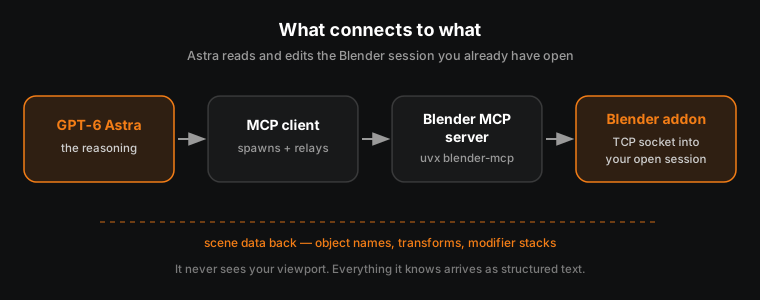
🧩 What Actually Connects to What
Four pieces, and it helps to know which one is failing when something breaks.
| Layer | What it is |
|---|---|
| GPT-6 Astra | OpenAI's model, released 3 September 2026. Does the reasoning. |
| MCP client | The app Astra runs inside. Spawns the server and relays messages. |
| Blender MCP server | A small Python process, installed with uvx, speaking the Model Context Protocol. |
| Blender addon | Opens a TCP socket inside Blender so the server can reach the running session. |
The important part is the last one. The addon means Astra is talking to the Blender you have open right now, with your scene in it — not to a headless copy, and not to a description of your scene that you typed.
🔌 Setting It Up
1. Install uv
uv is the Python package runner the server ships through. Use the official installer rather than pip:
# macOS
brew install uv

# Linux
curl -LsSf https://astral.sh/uv/install.sh | sh

# Windows (PowerShell)
powershell -c "irm https://astral.sh/uv/install.ps1 | iex"
2. Point your MCP client at the server
In a client that reads a JSON config, add:
{
  "mcpServers": {
    "blender": {
      "command": "uvx",
      "args": ["blender-mcp"]
    }
  }
}
Command-line clients usually have a one-liner instead — for Claude Code it is claude mcp add blender uvx blender-mcp.
Astra availability differs across ChatGPT's Chat, Work and Codex surfaces while it rolls out, so check OpenAI's current docs for which one exposes MCP connectors to you today. That detail moves faster than any blog post.
3. Install the Blender addon
uvx blender-mcp install-addon
Then in Blender: Edit ▸ Preferences ▸ Add-ons, and enable Interface: Blender MCP.
4. Start the socket
In the 3D viewport press N to open the sidebar, find the BlenderMCP tab, and click Start MCP Server.
💡 Run one MCP client at a time. Two clients both trying to hold the socket is the most common reason this silently stops working.
Requirements: Blender 3.0 or newer, Python 3.10 or newer, and a client that can spawn a stdio process.
🛠️ Making Something
The useful test is not "make me a castle". It is a real, tedious job.
Say you have forty imported props with inconsistent origins — a classic result of exporting from someone else's file. Normally that is forty rounds of selecting the object, moving the 3D cursor, and running Set Origin.
With the socket open, you describe the rule instead:
For every mesh object in the Props collection, set the origin to the centre of the object's bounding box on X and Y, but to the lowest vertex on Z, so each prop sits on the floor.
Astra reads the collection, sees the actual object names and transforms, writes the operator calls, runs them, and reports what changed. If object seventeen is a curve rather than a mesh, it can see that and skip it — which is where the script you would have pasted falls over.
Jobs with that same shape, where it genuinely saves time:
- Renaming to a convention —
SM_prefixes, suffix stripping, numbering by position - Auditing a file — which objects have non-uniform scale, n-gons, missing UV maps, or unapplied transforms
- Batch material assignment by name pattern
- Setting up repetitive lighting rigs across several shots
- Export prep — applying transforms, checking naming, flagging what will break on the way to an engine
Notice what these have in common. Every one is a rule applied many times, where the hard part is tedium rather than judgement.
⚠️ Where It Falls Apart
It cannot see your viewport. MCP returns scene data as structured text — names, transforms, modifier stacks. It is not looking at the render. Ask whether a composition reads well and you get a plausible-sounding answer built from coordinates, which is worth nothing.
Modelling is the wrong job for it. Anything where the answer is "that silhouette is wrong" needs an eye on the result. Code that extrudes faces in a loop produces geometry that is technically correct and artistically dead.
It will confidently do the wrong thing at scale. A human misreading an instruction ruins one object. This ruins forty, in one pass, consistently. Save before you let it touch anything, and keep the file under version control if the work matters.
Undo is not a safety net you should lean on. Operations driven through the Python API do not always land in the undo stack the way manual edits do. Treat every batch as permanent and work on a saved copy.
It is a running socket into your Blender session. That is exactly as much access as it sounds like. Fine on your own machine, worth thinking about on anything shared or under NDA.
🎯 So Is It Worth It?
For a working artist, yes — but as a technical assistant, not a creative one.
The honest framing is that it automates the part of the job a technical artist would script, without you needing to write the script. That is real value. A studio TA spends a lot of time on exactly these chores, and most freelancers have no TA at all.
What it does not do is shorten the path to being good. It will not teach you where seams go, why your blockout reads badly, or which of two lighting setups is better. Those are judgement, built from doing the work and having someone tell you when it is wrong.
If you are early enough that modelling itself is still hard, this is a distraction. Learn to drive Blender first. The automation is worth far more once you already know what you are automating — because then you can tell when it has done something stupid.
Read next: Blender and Unreal Engine: The Happy Couple — once a file is clean and consistently named, getting it into an engine stops being painful.
Automating chores is easy. Knowing which chores matter takes someone who has shipped. Book a free intro call →
Newsletter
Get more tips like this
Short, practical Blender guides for beginners — straight to your inbox. No spam. Unsubscribe any time.