How Long Does It Take to Learn Blender From Scratch?
2026-06-09
Everyone asks this before they start. The honest answer is: it depends on what you mean by "learn."
Blender is deep. You could spend a lifetime mastering every corner of it. But getting to a point where you're making things you're genuinely proud of? That's more achievable than most people think.
Here's a realistic breakdown based on consistent practice — even just 30–60 minutes a day.
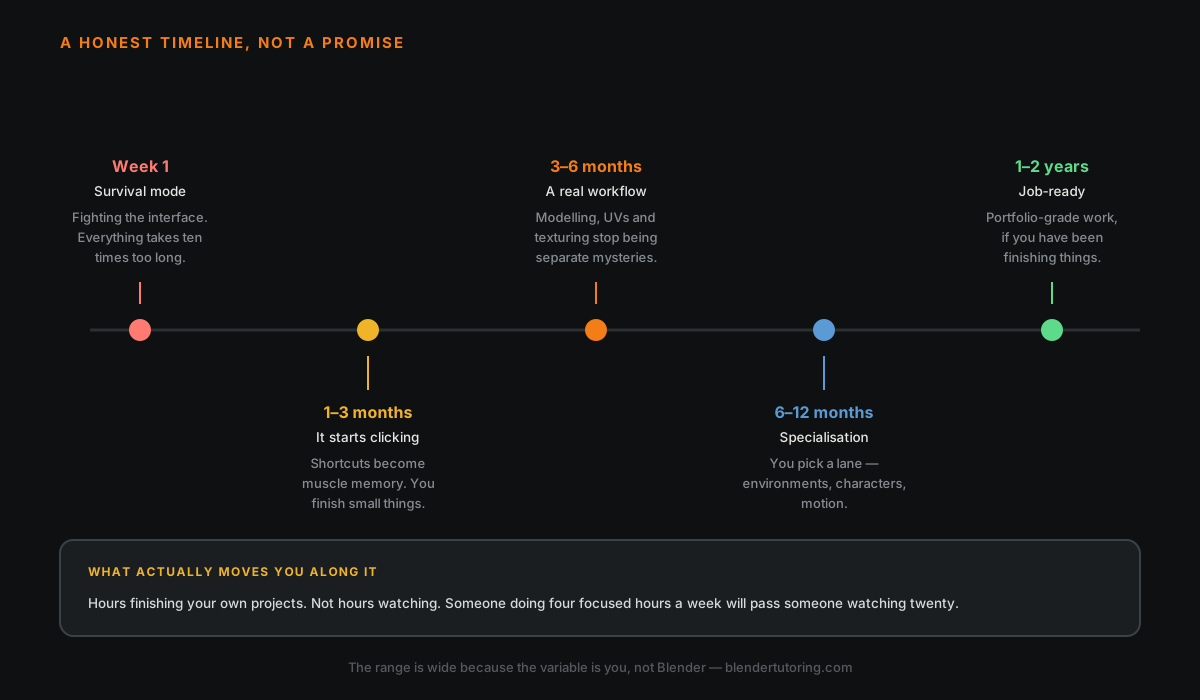
🗓️ Week 1 — Survival Mode
Your first week is mostly just figuring out how to move around. The Blender interface is unlike anything else — middle mouse button to orbit, scroll to zoom, numpad for views. It feels completely alien at first.
By end of week one, most beginners can:
- Navigate the 3D viewport without panicking
- Add, move, scale, and rotate basic objects
- Understand the difference between Object Mode and Edit Mode
- Complete a simple first render
💡 Don't judge yourself here. Everyone's first renders look rough. That's part of it.
📅 1–3 Months — Things Start Clicking
After a month of regular practice the interface stops feeling like a barrier. You start thinking about what you want to make instead of where the buttons are.
Skills that develop in this window:
| Skill | What you'll be able to do |
|---|---|
| Modeling | Furniture, props, simple hard surface objects |
| Materials | Basic PBR shaders, image textures |
| Lighting | 3-point lighting, HDRI setups |
| Rendering | Clean Cycles or EEVEE output |
💡 Milestone: You can follow along with most beginner tutorials without getting lost every 30 seconds.
📆 3–6 Months — Building a Real Workflow
This is where things get interesting. You're no longer just following tutorials step by step — you're starting to problem-solve on your own and combine techniques.
Skills that typically unlock here:
- Sculpting organic shapes (characters, creatures, props)
- UV unwrapping and texture painting
- Basic rigging and animation
- Geometry Nodes fundamentals
- Compositing and post-processing
💡 Milestone: You could start building a portfolio at this stage. Not job-ready yet, but good enough to show people.
🗓️ 6–12 Months — Specialization
By now most people have found their niche. Blender can do a lot of different things — and trying to do all of them at once slows you down significantly.
Common specializations:
| Path | Tools you'll focus on |
|---|---|
| Character art | Sculpting, retopology, rigging |
| Environment / archviz | Modeling, lighting, materials |
| Motion graphics | Animation, Geometry Nodes, compositing |
| Product visualization | Hard surface modeling, rendering |
| Game assets | Low-poly modeling, UV mapping, baking |
Picking a direction and going deep on it is the single best thing you can do at this stage.
🏆 1–2 Years — Job-Ready or Freelance Level
After a year or two of focused, consistent practice most people reach a level where their work is genuinely competitive — good enough to freelance or apply for junior positions in the industry.
This assumes you're not just passively watching tutorials but actively making things, finishing projects, and getting feedback.
The Realistic Timeline at a Glance
| Goal | Time estimate |
|---|---|
| Navigate Blender without frustration | 1–2 weeks |
| Make simple objects and render them | 1 month |
| Follow tutorials without getting lost | 1–3 months |
| Build portfolio-worthy pieces | 6–12 months |
| Freelance or job-ready | 1–2 years |
These assume 30–60 min/day of active practice — not just watching.
What Actually Slows People Down
Most people don't fail at Blender because it's too hard. They stall because of one of these:
- Tutorial hopping — watching 50 tutorials and finishing none of them
- No clear goal — trying to learn everything at once
- No feedback — repeating the same mistakes with no one to correct them
- Giving up after week one — the hardest week by far
The Fastest Way to Learn
The single biggest accelerator is personalized feedback. Tutorials are great, but they can't tell you why your topology is wrong, or why your specific render looks flat.
Working with someone experienced — even for a handful of sessions — can cut months off your learning curve by catching bad habits early and giving you a clear direction.
That's exactly what I offer at BlenderTutoring. If you want to learn faster with someone guiding you through it, book a session →
Newsletter
Get more tips like this
Short, practical Blender guides for beginners — straight to your inbox. No spam. Unsubscribe any time.