The Best Free Blender Tutorials for Beginners (2026)
2026-06-19
Blender has one of the best free learning ecosystems of any creative software. The problem isn't finding tutorials — it's knowing which ones are actually worth your time.
Here's an honest breakdown of the best free resources, what they're good for, and what order to use them in.
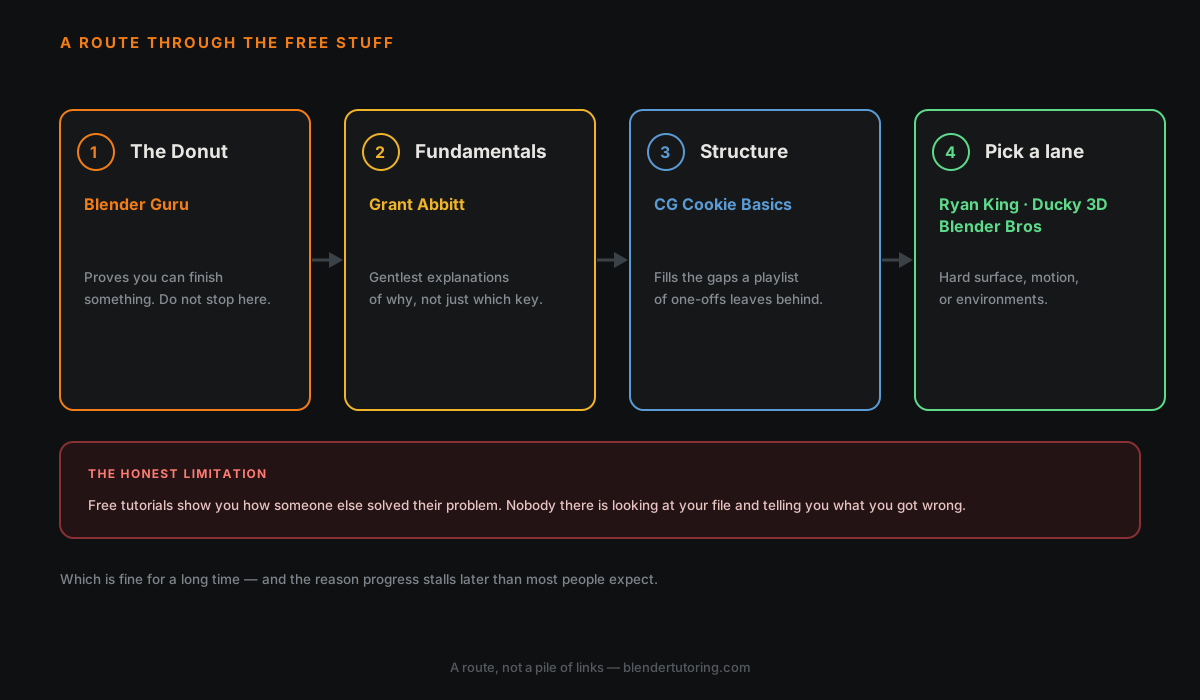
🏆 Start Here — The Donut Tutorial (Blender Guru)
If you've spent five minutes researching Blender, you've already heard about the Donut. And yes, it lives up to the hype.
Channel: @BlenderGuru — 3.4M subscribers
Andrew Price walks you through modeling a donut and coffee cup while teaching Blender's core tools. It's been remade four times to stay current — the latest version covers Blender 4.x.
What you'll learn:
- Basic modeling and Edit Mode tools
- Materials and the Shader Editor
- Lighting and rendering with Cycles
- Basic geometry nodes for sprinkles
💡 Why it works: You're making something real from day one. The context of "I'm making a donut" makes the tools easier to understand than abstract exercises.
Time investment: ~8–10 hours across the full series.
🎓 Best Channel for True Beginners — Grant Abbitt
Channel: @GrantAbbitt
If the Donut feels too fast, Grant Abbitt is your answer. He has a background in teaching and it shows — he explains concepts slowly, clearly, and never assumes you know things you don't.
Best series to start with:
- Learn Blender 3D from Scratch — his beginner series covers the full interface
- Beginner Character Modeling — great first character project
💡 Best for: Complete beginners who feel lost in the Donut tutorial or want more hand-holding before jumping in.
⚡ Best for Quick Tips — Blender Secrets
Channel: @BlenderSecrets
Jan Urschel packs a single useful Blender tip into 60 seconds. He has hundreds of these covering every area of Blender — modeling, shading, animation, rendering, compositing.
How to use it: Once you know the basics, watch these while you eat lunch. You'll constantly pick up things that improve your workflow.
💡 Best for: Intermediate beginners looking to fill gaps and find faster ways to do things they already know.
🤖 Best for Hard Surface & Sci-Fi — Ryan King Art
Channel: @RyanKingArt
Ryan posts almost daily and covers a huge range of topics. His sci-fi robot series is particularly good — it walks through modeling, texture painting, and basic animation in a structured way.
Best series:
- Sci-Fi Robot — modeling through to animation
- Beginner Blender Tutorials — shorter standalone projects
💡 Best for: Beginners who want to make game-style or sci-fi assets.
🌊 Best for Motion Graphics — Ducky 3D
Channel: @Ducky3D
If you're interested in abstract art, motion graphics, or satisfying looping animations, Ducky 3D is the channel. His tutorials lean heavily on Geometry Nodes and shading, and the results look impressive even for beginners.
💡 Best for: Anyone drawn to the abstract / motion design side of Blender rather than character or hard surface work.
🏗️ Best for Environment & Architecture — Blender Bros
Channel: @BlenderBros
Focused on architectural visualization and environment work. If you want to make realistic interiors, buildings, or product renders, this is a good channel to follow.
💡 Best for: Anyone interested in archviz, interior design renders, or realistic environments.
📚 Best Structured Course (Free) — CG Cookie Basics
Website: cgcookie.com
CG Cookie has some free content alongside their paid courses. Their Blender Basics series is particularly well structured — more like a proper course than a collection of YouTube videos.
💡 Best for: Learners who prefer structured, chapter-based learning over YouTube playlists.
🗺️ Recommended Learning Path
Don't just binge tutorials randomly. Here's a path that actually builds skills:
| Stage | What to watch |
|---|---|
| Week 1–2 | Blender Guru Donut (parts 1–5) |
| Week 3–4 | Grant Abbitt beginner modeling series |
| Month 2 | Pick a project and follow Ryan King Art |
| Ongoing | Blender Secrets for daily quick tips |
| When ready | Specialise — Ducky 3D, Blender Bros, etc. |
The Honest Limitation of Free Tutorials
Free tutorials are incredible — but they have one gap: they can't see what you're doing wrong.
You can follow 50 tutorials perfectly and still be building bad habits — topology mistakes, inefficient workflows, render settings that are hurting your results. A tutor can spot these in minutes and save you months of frustration.
Read next: What to Make After the Blender Donut Tutorial — what to do once the tutorials stop being enough.
Want feedback on your actual work instead of just following along? Book a session →
Newsletter
Get more tips like this
Short, practical Blender guides for beginners — straight to your inbox. No spam. Unsubscribe any time.