What to Make After the Blender Donut Tutorial
2026-07-24
If you're reading this, chances are there's a render of a pink-frosted donut somewhere on your hard drive. Maybe with sprinkles that took an entire evening to get right.
Congratulations — genuinely. Blender Guru's donut is where a huge share of all Blender artists start, and finishing it puts you ahead of everyone who gave up at "how do I rotate the camera."
But now comes the question the tutorial doesn't answer: what next?
🍩 First, Give Yourself Credit
The donut quietly taught you more than you think:
- Navigating the viewport and manipulating objects
- Modifiers (Subdivision Surface, and why non-destructive matters)
- Shading nodes and procedural textures
- Particle systems (those sprinkles)
- Lighting, camera setup, and rendering
- Basic compositing
That's a real foundation. The problem is what most people do with it next.
🕳️ The Trap: Tutorial Hell
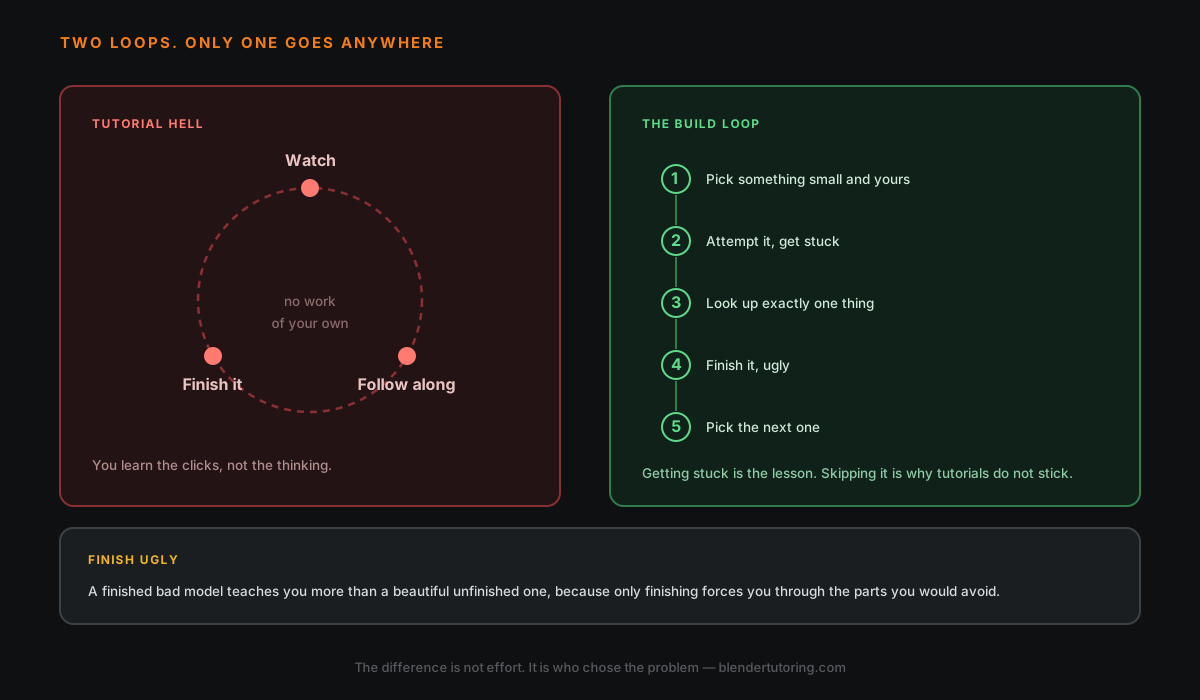
Here's the pattern. The donut felt great, so you queue up another tutorial. Then another. Six months later you've built a chair, a sword, a sci-fi corridor, and an isometric room — all by following someone else's clicks — and one evening you open Blender, stare at the default cube with no video playing, and realize you don't know how to start.
That's tutorial hell, and it's not a talent problem. It's a learning-method problem:
| Following a tutorial | Making your own project |
|---|---|
| Someone else solves every problem | You solve the problems |
| Feels productive immediately | Feels slow and uncomfortable |
| Skills evaporate in days | Skills stick for good |
| Ends with their artwork | Ends with yours |
💡 Watching someone model is like watching someone go to the gym. The reps only count when they're yours.
🧭 The Fix: One Small Project of Your Own
Not a portfolio piece. Not a short film. One small, finishable project, chosen with three rules:
- Small enough to finish in one or two weeks at your normal practice pace
- Personal enough to care about — model something from your life or your taste
- One new skill beyond the donut — not five
Some ideas, depending on what pulls you:
| If you like... | Try making... | New skill it adds |
|---|---|---|
| Cozy interiors | A corner of your actual room | Reference-based modeling |
| Food renders | Your favorite dish (not a donut!) | Sculpting organic shapes |
| Games | A single prop from your favorite game | Clean topology, UV unwrapping |
| Stylized art | A tiny low-poly diorama | Composition, color palettes |
| Product design | A gadget on your desk | Hard-surface modeling, studio lighting |
| Motion | A 5-second looping animation | Keyframes, easing |
The donut gave you the same starting point as everyone else. Your first project is where your work starts looking like you.
🔁 The Loop That Actually Builds Skill
Once you have a project, tutorials change jobs: they stop being your curriculum and become your reference library.
- Work on your project until you hit something you can't do
- Search for exactly that one thing ("blender bevel only one edge")
- Watch two minutes, apply it, close the video
- Repeat until finished
- Share it somewhere and start the next one
This loop — stuck, look up, apply, finish — is the entire difference between people who quit at the donut and people who get good.
💡 Getting stuck isn't a sign you're doing it wrong. Getting stuck is the workout.
🏁 Finish Ugly
Your first solo project will be worse than your donut. That's expected — the donut had a world-class artist steering; this time it's just you.
Finish it anyway. Three finished, flawed projects will teach you more than one endless masterpiece, because the last 20% of a project — lighting, framing, rendering, calling it done — is a skill you only build by getting there.
The Part Nobody Tells You
There's one thing the make-search-finish loop can't give you: someone who looks at your work and tells you why it doesn't look right yet — the topology habit that will hurt you in month three, the lighting mistake you can't see because you've stared at the scene too long.
That feedback gap is exactly why we do one-on-one mentoring: you build your own project from start to finish with a mentor who unblocks you in minutes instead of days.
Read next: two walls most people hit right after the donut — UV Unwrapping, Without the Panic and Cycles vs EEVEE. And if you're wondering how long all this takes, here's an honest breakdown.
Finished your donut and want a clear path to work you're proud of? Book a free intro call →
Newsletter
Get more tips like this
Short, practical Blender guides for beginners — straight to your inbox. No spam. Unsubscribe any time.