Why Your Blender Render Is Noisy — and How to Fix It
2026-10-17
Your render looks like a sandstorm. The first advice you will find is "turn up the samples", so you set it to 4096, go to bed, and wake up to a render that is still grainy and took nine hours.
Samples are the brute-force answer, and usually the wrong first move. Noise is not one problem. There are four common kinds, they have different causes, and the fix for one does nothing for the others.
Work out which one you have first.
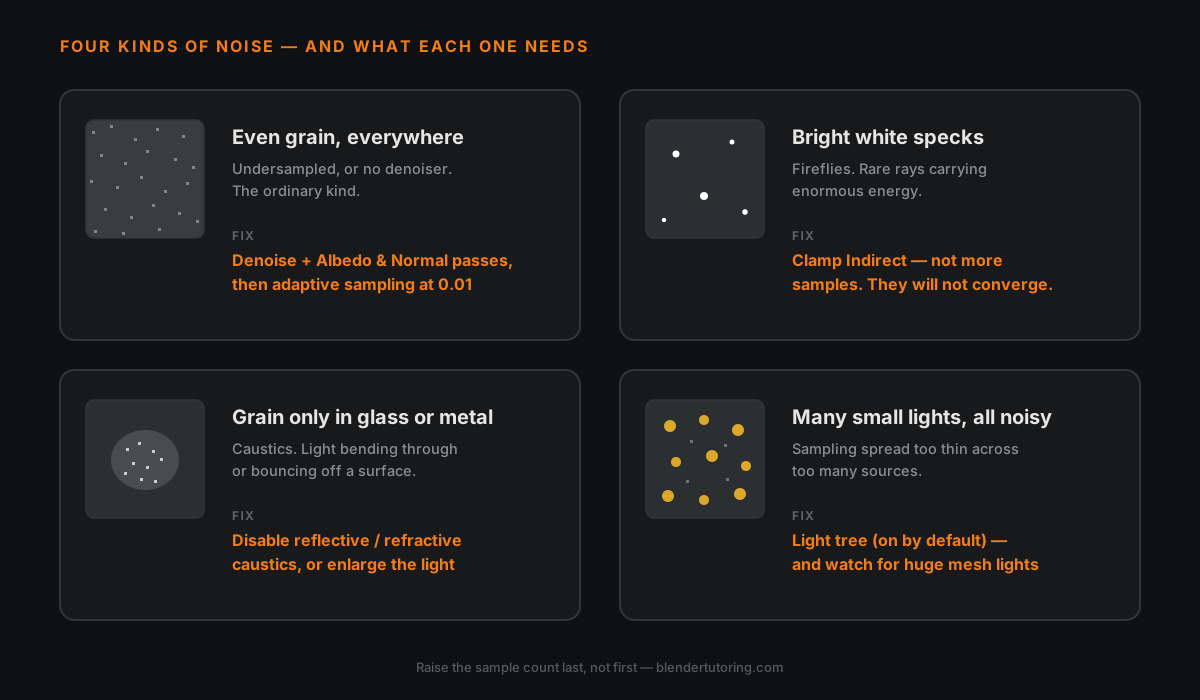
🔍 Which Noise Do You Have?
| What you see | What it is | What fixes it |
|---|---|---|
| Even grain across the whole image | Not enough samples, or no denoiser | Denoising + adaptive sampling |
| Single bright white dots, scattered | Fireflies — a few rays hit something extremely bright | Clamping indirect light |
| Grain only in glass, water or shiny areas | Caustics | Turn caustics off, or soften the light causing them |
| Grain in a scene with lots of small lights | Light sampling spreading itself thin | Light tree, and check for giant mesh lights |
Everything below is just those four in detail.
🧹 Grain Everywhere: Denoise First
If you are rendering without denoising in 2026, this is your whole problem.
OpenImageDenoise is built in, works on any hardware, and is very good. Turn it on in Render Properties. Then do the part most people miss: enable the Albedo and Normal passes for it. The Blender manual is explicit that the more passes the denoiser has access to, the better the result — without them it is guessing at what is detail and what is noise, and it will smear your textures.
With denoising on and those passes enabled, common guidance is that most scenes clean up somewhere around 64–128 samples. Treat that as a starting range, not a target.
Then turn on adaptive sampling, which stops sampling parts of the image that are already clean instead of grinding every pixel to the same count. The noise threshold controls how clean is clean enough; 0.01 is the usual suggested starting point. Lower is cleaner and slower. This is where your render time actually goes.
✨ Fireflies: Clamp, Don't Sample
Fireflies are the bright white specks. They are not general noise and more samples will barely touch them — adaptive sampling in particular cannot converge on them in any sensible number of samples, because they come from rare rays carrying enormous energy.
The fix is Clamp Indirect, under Light Paths. It caps how much light a single indirect ray is allowed to contribute.
One widely shared figure is 10.0 as an indirect clamp that kills most fireflies without visibly changing the lighting. That is one person's rule of thumb rather than an official default, so test it on your own scene. Clamp too hard and you will quietly flatten your bounce light — the image gets cleaner and deader at the same time.
Clamp indirect. Leave direct clamping alone unless you know why you are touching it.
💎 Caustics: Usually Just Turn Them Off
If the grain is concentrated in glass, liquid, or a shiny metal bouncing light onto a nearby surface, that is caustics — and caustics are notoriously expensive to resolve.
Under Light Paths, you can disable reflective and refractive caustics independently. For most shots nobody will miss them. If the shot genuinely needs them, the usual culprit is a small, very intense light — making that light physically larger spreads the energy and calms the caustic down.
💡 Lots of Lights: The Light Tree
If your scene has many lights — a street at night, a ceiling of spots — Cycles has to decide which ones to sample for each ray. Done naively, it spreads itself thin and everything gets noisy.
The light tree solves this by sampling important lights more often. It is on by default, under Sampling ▸ Lights, and Blender's release notes describe it as significantly reducing noise at the cost of somewhat longer render time per sample.
Two things worth knowing, because they explain the cases where it seems to make things worse:
It assumes physically sensible lighting. It does not account for custom falloff, ray visibility tricks, or complex shader setups including textures. Lean on those and the light tree can misjudge importance.
One huge mesh light can hijack it. A very large emissive plane can be rated as important and pull samples away from the lights that actually matter. You can exclude mesh lights from the tree if you hit this.
If turning the light tree off makes an image look different rather than just noisier, clamping is usually why — clamping is biased, and the light tree generally needs less of it.
⚙️ The Order To Do It In
- Denoise, with Albedo and Normal passes on.
- Adaptive sampling, threshold around 0.01.
- Clamp indirect if you have fireflies.
- Kill caustics if the grain is in glass or metal.
- Check the light tree if you have many lights.
- Only now raise the sample count, and only as far as it takes.
Six is last for a reason. Samples are the expensive fix, and if steps one to five were wrong, more samples just buys you a slower version of the same bad image.
🎯 The Underlying Point
Noise is information about your scene. Even grain means you are undersampling. Fireflies mean something in your scene is far brighter than everything else. Caustic noise means light is doing something complicated through a surface. Many-light noise means the renderer is being asked to guess.
Each one is telling you where the renderer is struggling. Reading that, rather than reaching for the sample slider, is most of what separates someone who renders quickly from someone who leaves the machine on overnight and hopes.
If you are still deciding whether to be in Cycles at all, that is a different question with a different answer.
Read next: Cycles vs EEVEE: Which Should You Use? — half of all noise problems are solved by not using a path tracer for that shot in the first place.
Renders still grainy after all that? Book a free intro call → and we will look at the actual scene.
Newsletter
Get more tips like this
Short, practical Blender guides for beginners — straight to your inbox. No spam. Unsubscribe any time.