Should You Upgrade to Blender 5.2 LTS?
2026-10-17
Blender 5.2 LTS landed in July 2026 and is supported until July 2028. Every "what's new" post will show you the feature list. None of them answer the question you actually have, which is: if I upgrade, does my setup still work on Monday?
Short version:
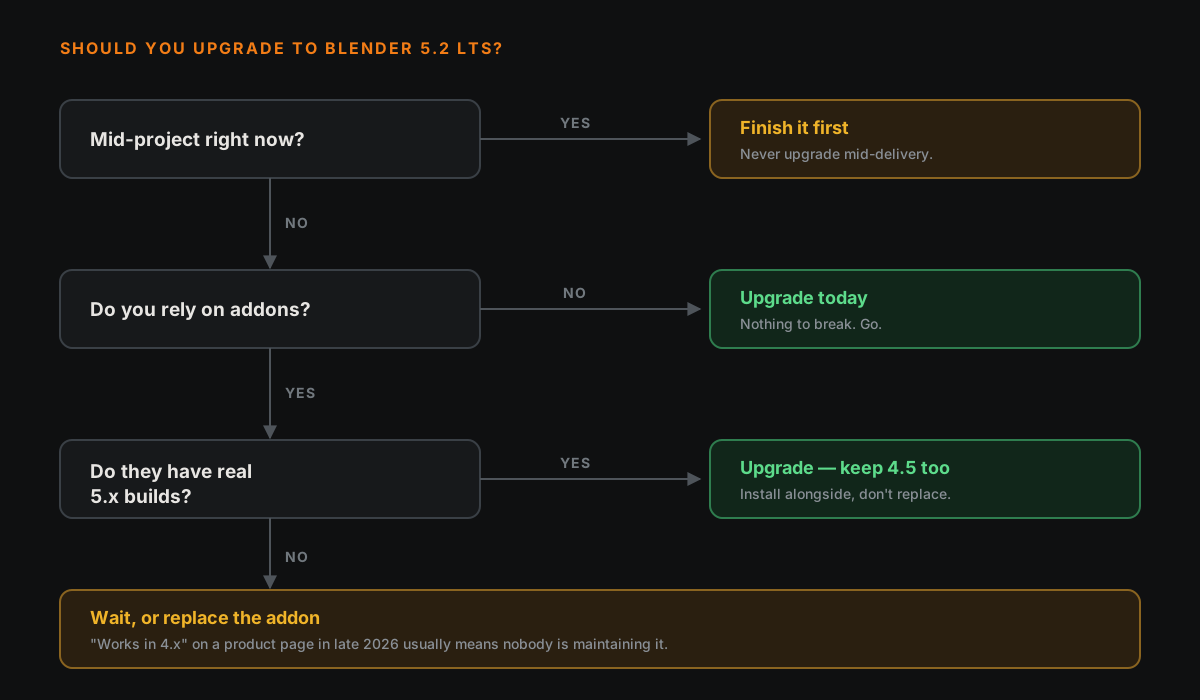
- Learning Blender, few or no addons? Upgrade. Go to 5.2 LTS today, don't look back.
- Mid-project with a pile of addons? Finish the project first. Seriously.
- On 4.5 LTS for stability reasons? You have time. Move deliberately, not today.
The rest of this is why.
🧨 The Thing That Actually Breaks
Not your files. Blender opens old .blend files fine, and it has for years.
Addons. That is the whole story. The 5.x line made a series of Python changes, and every one of them has left some addon broken until its author catches up.
Here is what changed, in artist terms rather than developer terms:
| Version | What changed | What it breaks |
|---|---|---|
| 5.0 | Properties from the addon API moved out of the custom-properties container, so dictionary-style access like scene['cycles'] stopped working | Addons that poke at settings directly — a very common shortcut |
| 5.0 | The compositor's scene.node_tree was removed; the legacy Action API was replaced by layered actions; Grease Pencil moved to a new data model | Compositing addons, animation tools, anything Grease Pencil |
| 5.1 | Python moved from 3.11 to 3.13 | Anything shipping compiled code — it has to be rebuilt, not just edited |
| 5.2 | Geometry Nodes modifier inputs moved behind a new properties path | Addons that drive Geometry Nodes from Python |
The 5.0 changes are in Blender's official Python API release notes. The later two are widely reported by addon developers; treat the specifics as developer accounts rather than gospel, but the pattern is not in dispute.
None of this is Blender being careless. Removing a bad API is how a program stays maintainable for twenty years. It just means "will my addons work" is a real question now in a way it was not between 4.0 and 4.5.
📋 The Ten-Minute Check
Do this before you move a project across, not after.
- Write down the addons you actually use. Not the ones installed — the ones you'd miss. For most people it is four or five.
- Check each one's page for a 5.x release. Not "compatible with 4.x", an actual build.
- Install 5.2 alongside, not over. Blender happily runs multiple versions side by side. Keep 4.5 until you are sure.
- Open your heaviest recent file in 5.2. Render a frame. Compare it to the same frame from 4.5.
- Only then make it your default.
Step 3 is the one people skip and regret. There is no reason to delete the version that works.
✨ What You Get For The Trouble
Across the 5.x line, the things most likely to matter to you:
ACES colour management, added in 5.0. If you have ever wondered why your renders look different from everyone else's, or why your bright highlights go a strange colour, this is the area that governs it.
Node-based cloth and hair simulation, new in 5.2 and flagged experimental. Procedural simulation driven from Geometry Nodes rather than the old modifier stack. Genuinely interesting, genuinely not something to put on a deadline yet.
Remote asset libraries. You can host a library elsewhere and have it show up in the asset browser. Mostly a studio feature, but useful if you work across two machines.
Hydra 2.0 for USD, plus glTF import and export of point clouds. Pipeline plumbing — invisible until the day it saves you.
Cycles image caching and a Thin Wall shading mode, both quality-of-life wins in rendering.
Volumes and SDF nodes arrived in 5.0 too, if you do anything procedural.
🎓 If You Are Still Learning
Upgrade, and stop thinking about it.
Almost every reason to stay on an older release is a production reason: a studio pipeline, a client deliverable, an addon your workflow depends on. If you are learning, you have none of those. What you do have is tutorials — and tutorials written for 4.x still work fine, because the fundamentals the tutorials teach have not moved.
The one thing to know is that LTS means Long Term Support, not "more stable". Both are tested the same. LTS just gets bug fixes for two years instead of a few months. For learning, it makes no practical difference; pick the LTS anyway so you stop thinking about versions for two years.
What will actually slow you down is not the version number. It is the gap between following a tutorial and being able to work without one.
🎯 The Verdict
Upgrade if: you are learning, between projects, or your addon list is short and already supported.
Wait if: you are mid-project, or you depend on an addon whose author has gone quiet. "Works in 4.x" on a product page in late 2026 usually means nobody is maintaining it.
Never: upgrade the version you are actively delivering on. Finish, ship, then move. That rule has nothing to do with Blender and everything to do with not losing a week to something avoidable.
Read next: Blender and Unreal Engine: The Happy Couple — if you are upgrading because of pipeline work, this is the other half of it.
Still deciding what to learn first? Book a free intro call →
Newsletter
Get more tips like this
Short, practical Blender guides for beginners — straight to your inbox. No spam. Unsubscribe any time.