Text-to-3D in Blender: What AI Can and Can't Model Yet
2026-10-16
Search "best AI 3D tools" and you will get a dozen ranked lists. Almost all of them are written by the companies selling the tools, or by affiliates earning a cut. That is not a conspiracy, it is just how that corner of the internet pays for itself — but it does mean the honest answer is hard to find.
So here is the honest answer, from someone who ships game art for a living.
Text-to-3D is genuinely useful now, for a narrower set of jobs than the marketing suggests. The dividing line is not quality. It is whether the thing you are making has to move.
🧪 What You Actually Get Back
Type a prompt, wait a minute, download a mesh. The silhouette is often impressive. Then you open it in Blender and look at the wireframe.
Raw generations are enormous. One 2026 review of Tripo found its raw output running past a million vertices. That is not a model you put in a scene; it is a photogrammetry-grade blob that happens to have been imagined rather than scanned.
Every serious tool now ships a retopology step to deal with this, and the vendors have converged on quad output as the headline feature:
| Tool | Topology story | Positioned for |
|---|---|---|
| Meshy 6 | AI Retopology rebuilds any mesh — including ones made elsewhere — as quad-dominant or triangles, anywhere from 100 to 300,000 faces | Characters, rigging |
| Tripo P2.0 | Claims native quad-dominant generation rather than a separate retopo pass. Its August preview capped at 50,000 triangles or 25,000 quads | High-volume game props |
| Rodin (Hyper3D) | Quad remesh available as a post-step | General purpose |
| Dream Textures | Not a modeller — Stable Diffusion inside Blender, free and open source. ControlNet reads your scene depth and normals | Texturing what you already have |
Tripo's P2.0 quad generation was announced in September 2026 and I have not seen independent testing of it yet. Treat the claim as a claim.
🧵 The Part Nobody Markets
Here is where it matters, and it is the one thing the comparison posts skate over.
Quad-dominant is not the same as good topology.
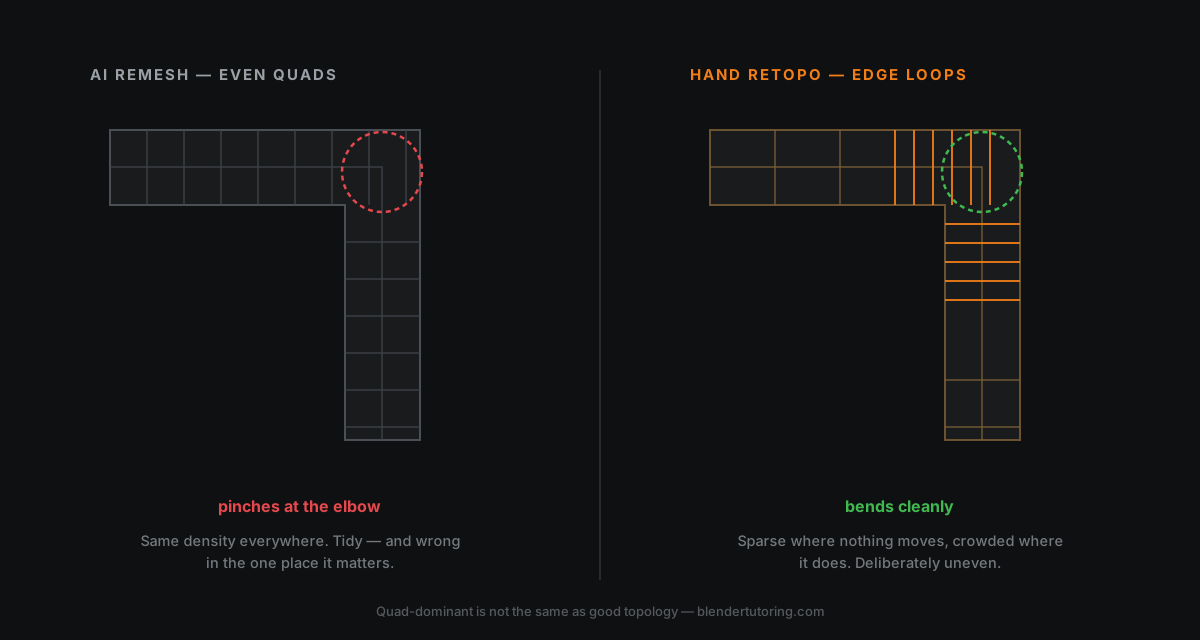
A remesher gives you quads spread evenly across the surface, like graph paper wrapped around a shape. Even. Tidy. Screenshot-friendly.
Good character topology is not even. It is deliberately uneven — loops crowded around an elbow, a knee, the corners of a mouth, and sparse across flat areas that never deform. That density is not decoration. It is what lets a joint bend without the mesh pinching into a crease.
No current remesher does that, because deciding where the loops go requires knowing how the thing will be rigged and animated. That is a judgement about the future of the asset, not a property of its surface.
So:
- Static prop? Even quads are completely fine. Nothing bends, nothing pinches.
- Anything that deforms? You are getting a starting mesh, not a finished one.
✅ What It Is Genuinely Good At
I use these tools. Not for hero assets — for the jobs below, where they save real hours.
Set dressing and background filler. A scene needs forty crates, barrels, bits of debris. Nobody will ever look at the wireframe. Generate, decimate, scatter, done.
Blockout and proportion. Getting a rough mass into the scene fast, to judge composition and scale before committing. Faster than greyboxing by hand, and you delete it later anyway.
Reference and kitbash parts. Generate something, keep the one interesting mechanical detail, throw the rest away. This is the one I reach for most.
Texturing an existing model. Dream Textures is a different proposition from the generators — it is not inventing geometry, it is painting onto geometry you already control. Because ControlNet can read your depth and normal passes, the result actually follows the form instead of floating on top of it.
❌ Where It Falls Over
Anything rigged. See above. The loops are not there and the tool cannot know where to put them.
Hard-surface precision. Generators are soft on exactly the things that read as manufactured: crisp bevels, consistent panel gaps, screws that line up. A 2mm bevel that is sometimes 3mm looks wrong and nobody can say why.
Hero assets. The thing the camera lingers on is the thing worth modelling properly. It is also, usually, the thing a portfolio is judged on.
UVs. Automatic unwraps from these tools are generally awful. You will redo them. Which is a skill worth having anyway.
🔧 A Workflow That Holds Up
If you want this in a real pipeline rather than a demo:
- Generate at high quality, not high poly count. Resist the urge to max the slider — you are throwing most of it away.
- Retopo or decimate in Blender, not in the generator. You keep control, and the decimate modifier is non-destructive while you decide.
- Unwrap yourself. Always.
- Texture in Blender — Dream Textures, or hand-painted, or a normal baked from the dense original before you deleted it. That last trick is the one people miss: the million-vert blob is a perfectly good high-poly source to bake from.
- Check it in engine early. A mesh that looks fine in the viewport can shade badly under a game renderer.
Step 4 is where the dense raw output stops being a problem and becomes an asset. Bake it down, then bin it.
🎯 So, Should You Use It?
Yes — the way you would use any other tool that is good at one thing.
What worries me is not artists using AI. It is beginners using it instead of learning, and concluding that modelling is solved. It isn't. What these tools automate is the generation of surface. What they cannot do is decide where the loops go, why a silhouette reads badly, which of two shapes is more interesting, or how an asset should be built so the next person can work with it.
That is the actual job. It is also, conveniently, the part that is still worth learning — and the part that makes you employable in a year when the generators are twice as good.
Learn to model properly. Then let the robot make your forty crates.
Read next: Connecting GPT-6 Astra to Blender — the other half of AI in Blender, where the model drives your actual scene instead of handing you a mesh.
Knowing which shortcuts are safe takes someone who has shipped. Book a free intro call →
Newsletter
Get more tips like this
Short, practical Blender guides for beginners — straight to your inbox. No spam. Unsubscribe any time.