Quads vs Triangles in Blender: What Actually Matters
2026-10-17
"Always use quads. Never use triangles." You will hear this in your first week and keep hearing it forever.
It is about half right, and the half that is wrong causes real damage — people spend hours forcing an all-quad mesh in places where it buys them nothing, and leave n-gons sitting in places where they genuinely matter.
Here is what is actually going on.
🎮 Your Engine Never Sees A Quad
Start with the fact that undermines the rule.
Realtime engines draw triangles. Only triangles. When you export to Unreal or Unity, your mesh is triangulated on the way out whether you like it or not. The careful all-quad topology you built is converted before anything is drawn.
So "quads are better for games" cannot be about the final render, because there are no quads in the final render.
What it is actually about is three other things.
🧰 Why Quads, Then?
1. Editing. Loop cut, loop select, and most of the tools you use constantly follow quad loops. A mesh full of triangles is miserable to work on, not because it renders badly but because your tools stop helping you. This is the biggest day-to-day reason and it is almost never the one people cite.
2. Deformation. Quads bend predictably. This is the one that genuinely matters for anything rigged — a joint built from clean quad loops creases where you expect, and one built from scattered triangles does not.
3. Subdivision. Subdivision surface works on quads. Feed it a triangle and you get a pinch; feed it an n-gon and you get something worse.
Notice that all three are about working on the mesh, not about displaying it. That is the real rule, and it is more useful than the one you were given.
⚠️ The Actual Villain Is The N-gon
Triangles get the blame. N-gons deserve it.
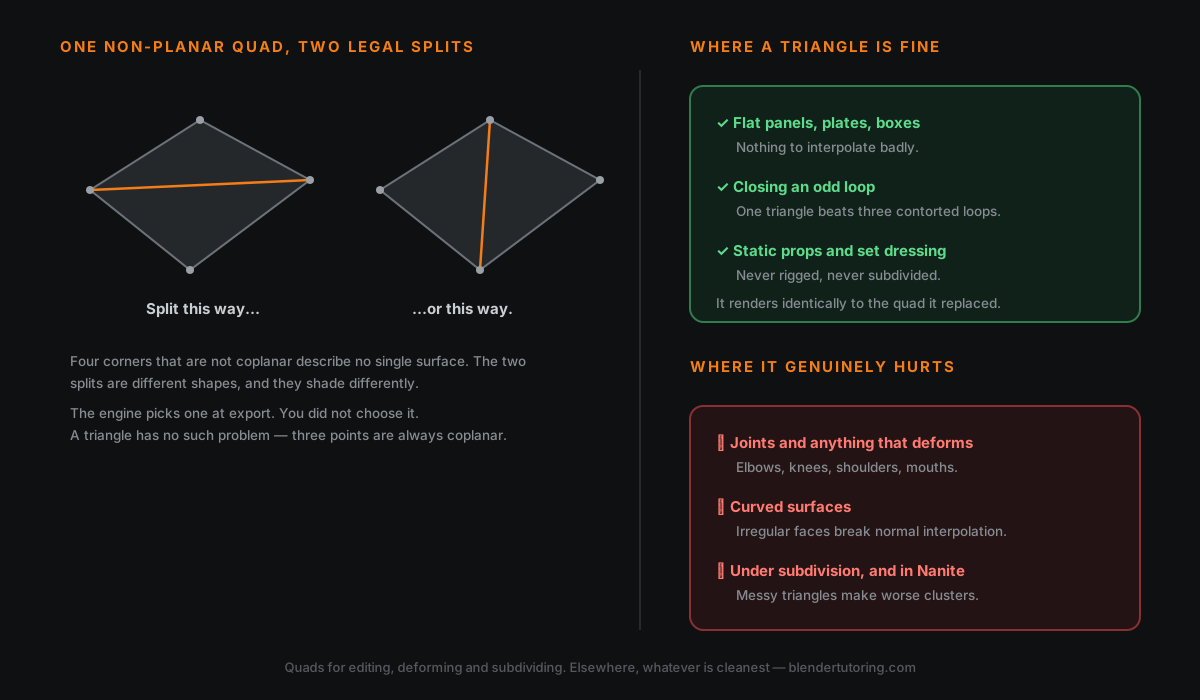
A triangle's three vertices are, unavoidably, on the same plane — three points always define a plane. A quad's four vertices do not have to be, and an n-gon's many vertices very often are not.
A non-planar face has no single correct surface. When the engine triangulates it, it has to choose a split, and depending on which diagonal it picks you get a measurably different shape and measurably different shading. Worse, that choice can be influenced by neighbouring faces, so the result is not reliably predictable from your side.
That is where mysterious shading seams come from — a dark crease across a flat panel that was not there in Blender. A triangle or n-gon sitting in the middle of an otherwise quad surface interrupts how normals interpolate across it, and the renderer shows you the join.
The fix is control, not avoidance. If a face must be an n-gon, triangulate it yourself before export so you decide the split, rather than letting the importer decide for you.
✅ Where Triangles Are Completely Fine
On anything rigid, flat, or hard-surface that does not deform and does not get subdivided, a triangle is simply a face. It will render identically to the two triangles your quad was about to become.
Specifically:
- Flat panels, plates, boxes — no curvature, nothing to interpolate badly.
- Closing an odd loop. Sometimes a surface ends on an uneven vertex count and the only options are one triangle or a pile of contortions to avoid it. Take the triangle.
- Props and set dressing that will never be rigged.
- Anywhere the alternative is worse. A single clean triangle beats three extra loops added purely to preserve a rule.
A well-placed triangle on a flat surface costs you nothing. Chasing it out can cost you an afternoon.
❌ Where They Genuinely Hurt
- Joints and anything that deforms. Elbows, knees, shoulders, mouths. This is the real one.
- Curved surfaces, where normal interpolation across an irregular face shows up as a visible artefact.
- Anything going through subdivision.
- Dense irregular triangle soup in Unreal 5. Nanite clusters meshes for efficiency, and irregular triangles produce worse cluster boundaries. Nanite handles enormous triangle counts well; it handles messy triangles less well.
The pattern across all four: triangles cause problems where the surface has to be interpreted — bent, smoothed, or subdivided. They cause none where it just sits there.
📦 Before You Export
Do this deliberately rather than hoping:
- Find your n-gons. Select ▸ Select All by Trait ▸ Faces by Sides, set to greater than 4.
- Fix the ones on curved or deforming surfaces. Leave the ones on flat panels.
- Add a Triangulate modifier before export so the split is yours, not the importer's.
- Check shading in the engine, not just in Blender. The triangulation is what the engine sees, so that is where the artefacts appear.
Step 3 is the one that separates people who get clean exports from people who file bug reports about shading.
🎯 The Rule, Rewritten
Not "never use triangles". Instead:
Use quads where the mesh has to be edited, deformed or subdivided. Elsewhere, use whatever is cleanest — and never leave a non-planar face for someone else to resolve.
That version tells you why, which means you can apply it to cases nobody warned you about. The original just tells you to be afraid of a three-sided face, which is how people end up with beautiful quad topology on a static crate and a mess around the one elbow that actually bends.
Topology is not a tidiness contest. It is a set of decisions about what the mesh has to survive.
Read next: Text-to-3D in Blender: What AI Can and Can't Model Yet — generators produce quad-dominant meshes now, which sounds like it solves this and does not.
Not sure whether your topology will survive rigging? Book a free intro call →
Newsletter
Get more tips like this
Short, practical Blender guides for beginners — straight to your inbox. No spam. Unsubscribe any time.