Blender Booleans Wreck Your Topology
2026-11-04
The Boolean modifier is the fastest way to punch a hole, merge two shapes, or carve a panel line in Blender. Select, subtract, apply, done — and the shaded result looks perfect. Then you add a Subdivision Surface modifier, or bake a normal map, or just switch to smooth shading, and the surface tears itself apart around the cut. Nothing went wrong in the moment. The damage was there all along, hidden in the topology the boolean left behind.
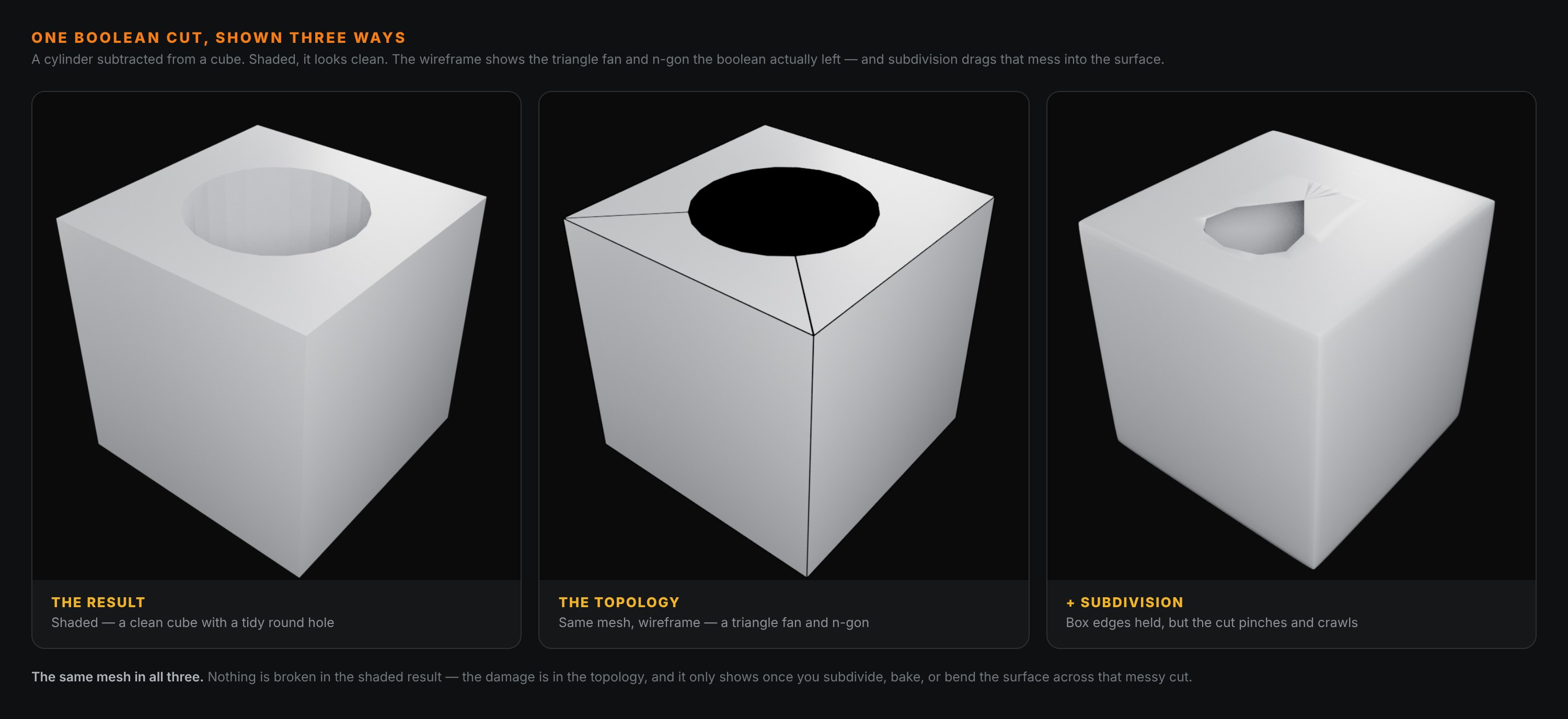
Look across the three panels. The left one is the boolean straight out of the oven — a clean cube with a tidy round hole. The middle one is the same mesh as a wireframe, and now you can see what the boolean actually did: it left a huge n-gon on the top face and a fan of long, thin triangles stretching from the hole out to the corners. The right panel is that same mesh subdivided, with the outer box edges held crisp on purpose — so the only thing left to go wrong is the cut, and it does. The round hole collapses into a lopsided, pinched crater.
That is the whole story of Blender booleans: they are a topology problem disguised as a modelling shortcut.
🔪 What A Boolean Actually Leaves Behind
The EXACT solver (the default, and the good one) is remarkably accurate at computing where two surfaces intersect. What it is not doing is thinking about edge flow. It cuts the intersection line into your mesh and closes up the faces however it can, and "however it can" means:
- An n-gon — the top face of the cube is now a single face with a circular hole bitten out of it, with far more than four sides.
- A triangle fan — to connect that hole to the corners, the solver drops in long, skinny triangles radiating outward.
- Coplanar and near-duplicate vertices along the seam, where the two surfaces met at a shallow angle.
On its own, flat and still, none of that matters. The faces are planar, the shading is flat, and a planar n-gon renders identically to a clean grid of quads. This is exactly why the left panel looks fine. The mesh is a liar.
🫠 Why It Looks Fine Until It Doesn't
Four things turn that hidden mess into a visible one, and all four are things you will almost certainly do to a hard-surface model:
Subdivision. Catmull-Clark subdivision wants quads. It averages each face against its neighbours, and a triangle fan has no consistent neighbourhood to average — so it pinches. The right panel is nothing but this. The cube keeps its shape because I bevelled its real edges, but the boolean cut has no such support and it crumples.
Baking. A normal-map or ambient-occlusion bake samples the surface's direction across every face. A triangle fan produces sudden shifts in that direction, and those show up in the bake as dark smears or hard creases around the cut that no amount of re-baking will fix.
Smooth shading. The same averaging problem, cheaper. Switch a booleaned mesh to smooth shading and you get shadow blotches fanning out from the cut — the classic sign of triangles and n-gons meeting at an awkward angle.
Deformation. Bend, bevel, or rig that surface and the uneven faces stretch unevenly. A quad grid deforms predictably; a triangle fan does not.
The pattern is always the same. The boolean result is fine as long as the surface is flat, hard-shaded, and never touched again. The moment you ask the surface to be smooth — to average itself across the cut — the topology underneath decides what you get, and messy topology gives you a mess.
✅ When Booleans Are Completely Fine
Before the fixes, the honest part: booleans are not a sin. Plenty of professional hard-surface work ships boolean geometry untouched. Use them freely when:
- The surface stays flat-shaded and hard — no subsurf, no smoothing across the cut.
- It is a game-ready low-poly that you will bake onto, not subdivide. The low-poly can carry n-gons happily as long as it triangulates cleanly for the engine.
- The model is a background or blockout asset that will never be deformed or examined up close.
The rule is not "never boolean." It is "never subdivide, bake, or smooth-shade a boolean you haven't cleaned up." Know which kind of asset you are making, and the decision makes itself.
🛠️ How To Fix The Mess
When you do need that cut to survive subdivision or a bake, here are the routes, fastest first:
1. Limit the shading damage
Add a Weighted Normal modifier, or turn on Shade Auto Smooth with a tight angle. This does not fix the topology, but it stops the triangle fan from throwing shading blotches, and for a flat hard-surface piece it is often all you need.
2. Clean the topology by hand
Select the mess and rebuild it as quads: dissolve the stray edges, then re-cut the area so the hole is ringed by a clean loop and the surrounding face is quads flowing around it. This is the real skill, and it is the same discipline as quads versus triangles — the goal is an edge loop circling the cut, not a fan stabbing through it.
3. Add support loops — after you have quads
Once the cut is ringed by a clean loop, you can add a support loop just outside it to hold the edge sharp under subdivision. Do this before cleanup and it does nothing — a support loop next to a triangle fan just pinches in a new place. Quads first, loops second.
4. Boolean as a blockout, then retopologise
For anything organic or high-value, treat the boolean as a rough draft. Punch the shapes fast, then retopologise a clean quad mesh over the top. You keep the speed of booleans for finding the form and the clean topology for everything downstream — this is how most production hard-surface high-polys are actually built.
5. Non-destructive + remesh, for the high-poly
If the mesh is headed straight for a bake and you do not care about the cage, stack the Boolean modifier live and follow it with a voxel or quad remesh to lay down an even surface. Heavy, but even — and even topology subdivides and bakes without pinching.
🎯 The Underlying Idea
A boolean answers the question "where do these two shapes intersect?" It does not answer "what should this surface be made of?" Those are different questions, and a modelling pipeline has to answer both. The solver hands you the first answer for free and leaves the second one entirely to you — which is fine, as long as you remember it is still owed.
So the mental model is simple. A boolean is not a finished surface; it is a very accurate cut line with some provisional faces thrown in to close the gap. Treat it as the start of the topology conversation, not the end of it, and the cut stops being a landmine. Shade it flat and ship it, or clean it to quads and subdivide it — both are fine. The only mistake is subdividing the provisional version and wondering why it melted.
Read next: Retopology in Blender: Turning a Sculpt Into a Usable Mesh — the clean-topology step that turns a fast boolean blockout into a mesh that bakes and deforms without a fight.
Fighting pinched, blotchy booleans and not sure whether to clean them or start over? Book a free intro call → and share your screen. Boolean cleanup and edge flow are exactly the kind of thing that takes one session to make permanent sense of, and weeks to piece together from forum threads.
Newsletter
Get more tips like this
Short, practical Blender guides for beginners — straight to your inbox. No spam. Unsubscribe any time.