Blender MCP in 2026: What the Setup Guides Leave Out
2026-10-24
There is no shortage of guides for connecting an AI assistant to Blender. Most of them work. What almost none of them tell you is what you just agreed to, why half the commands on the internet use a package name that no longer exists, and why the version requirement in one guide flatly contradicts the next.
This is the article for the twenty minutes after the setup worked.
📦 The Package Was Renamed, Which Explains The Confusion
If you have been copying commands and getting inconsistent results, start here.
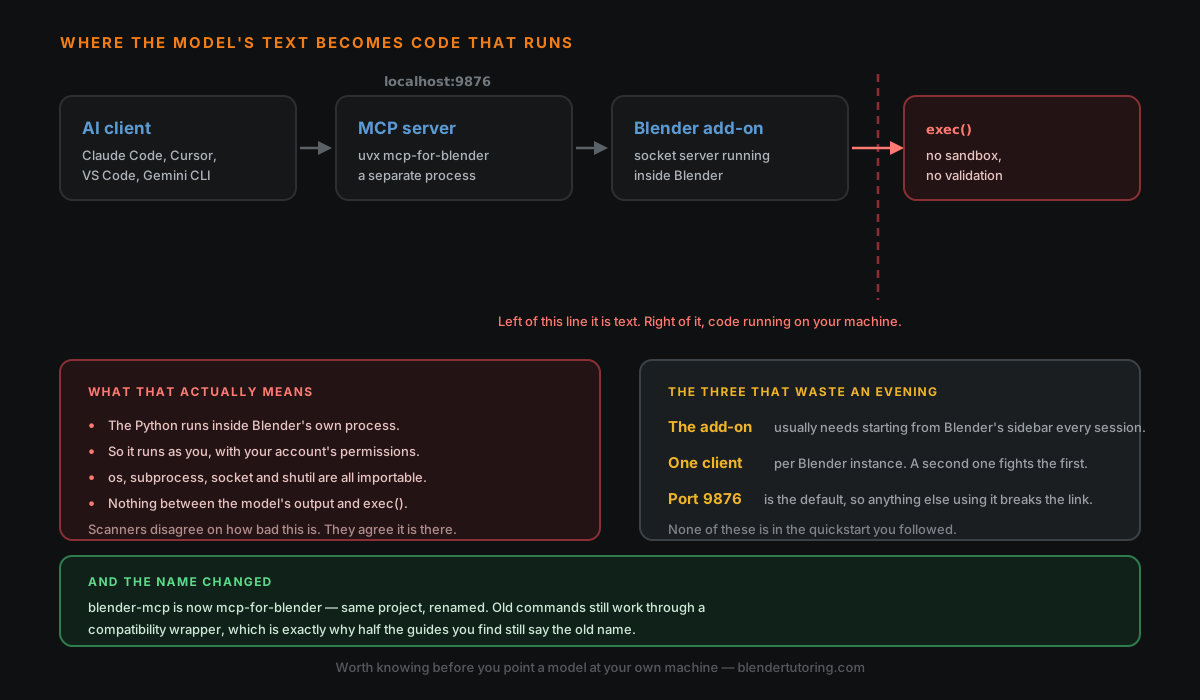
blender-mcp is now mcp-for-blender. Same project, same author, renamed — the PyPI package and the GitHub repository both moved. New installs should use uvx mcp-for-blender.
The reason the internet has not caught up is that the old name still works. blender-mcp remains on PyPI as a compatibility wrapper that installs the new package for you, so every existing setup kept running and nobody was forced to notice. That is good engineering and terrible for anyone searching, because a guide written under the old name still appears to work, which makes it look current when it is not.
If a guide tells you to run the old command, it is not wrong. It is just old, and you should assume everything else in it is the same vintage.
🏷️ It Is Not The Official Blender Tool
Worth being clear about, because the naming invites the assumption.
The community plugin describes itself plainly as not affiliated with the Blender Foundation. Part of the motivation for the rename was to stop it being confused with official efforts in the same space.
That is not a criticism of the project, which is widely used and actively maintained. But it does mean the usual expectations apply: it is a third-party add-on with third-party review, and the security section below is not hypothetical.
🔢 The Version Requirements Genuinely Contradict Each Other
Here the guides do not merely differ in age — they disagree outright.
Older write-ups say Blender 3.0 or newer. At least one 2026 guide insists the add-on requires 5.1 and that a commonly-shown 4.2 figure is simply wrong.
I am not going to adjudicate that, because I cannot verify it and the answer will have moved again by the time you read this. Check the add-on's own stated requirement at the moment you install it, and treat any version number in a blog post — including this one — as the number that was true for somebody else, once.
This is the single most common reason a setup fails silently: the add-on installs, Blender does not complain, and nothing connects.
🔓 The Part The Walkthroughs Skip
Here is what the setup actually gives the model.
The chain is: your AI client talks to an MCP server running as a separate process, which forwards commands over a socket — localhost port 9876 by default — to an add-on running inside Blender. That much is in every guide.
What is usually left out is the last step. The server exposes a tool for executing Blender Python, and by the project's own issue tracker that tool passes model-supplied code to exec() with no sandboxing and no validation.
Which means, concretely:
- The Python runs inside Blender's own process.
- It therefore runs as you, with your user account's permissions.
- Standard library modules — os, subprocess, socket, shutil — are all importable.
- There is nothing between what the model produced and what runs.
On how serious this is, the sources disagree and I will not pretend otherwise. One runtime-tested report counts several confirmed issues including critical ones; an automated scanner rates the same repository low overall while still flagging the exec call itself as critical. They are measuring different things. What nobody disputes is the mechanism.
The practical mitigations people actually recommend are blunt ones: run it on a separate machine, or in a firewalled VM, or use a server that refuses code execution by default and confines file access to specific paths.
My own position, for what it is worth: this is fine on a hobby machine with nothing sensitive on it, and I would not run it as-is on a machine holding client work. The risk is not that the model turns malicious. It is that the model is working from text — your prompt, a file it read, a web page — and anything that can influence that text can influence what gets executed.
🧱 Three Things That Waste An Evening
In rough order of how often they catch people:
- The add-on usually needs starting from Blender's sidebar every session. Installing it is not enough; the socket server has to be running. A great many "it stopped working" reports are this.
- One client per Blender instance. Point two at the same Blender and they fight. If you have Claude Code and an editor both configured, close one.
- Port 9876 is the default, so anything else already using it breaks the link in a way that reads like a broken install.
🎯 What It Is Genuinely Good At
Having been appropriately gloomy, the honest positive case.
It is good at the things that are tedious rather than creative: inspecting a scene and telling you what is in it, renaming and reorganising objects in bulk, applying a repetitive operation across many objects, and writing the throwaway Python you would otherwise have looked up. It is a competent operator of Blender's API with a very good memory for its names.
It is weaker exactly where you would hope it was strong. Complex geometry node setups and custom modifier stacks remain substantially manual. Anything it generates still needs the usual topology scrutiny before it will deform or subdivide properly — which is the same limitation that applies to text-to-3D generation generally.
It cannot see your viewport. It is working from structured text about your scene, not from the render, so asking whether a composition reads well gets you a plausible sentence assembled from coordinates.
✅ If You Are Setting It Up Today
- Use mcp-for-blender, not the old name, and ignore the version numbers in blog posts.
- Check the add-on's current Blender requirement before blaming your install.
- Start the add-on from the sidebar each session.
- One client at a time, and check nothing else holds port 9876.
- Decide deliberately which machine this runs on, knowing the code tool is unsandboxed.
- Use it for the tedious work, not for the judgement calls.
🎯 The Underlying Idea
Every one of these problems comes from the same place: this is a young, fast-moving, community-built bridge between two large systems, and the written record around it ages in months rather than years.
So the useful habit is not memorising a setup. It is knowing which parts are load-bearing — the package name, the version requirement, where the trust boundary sits — and checking those three at the source rather than in a blog post. Including this one.
Read next: Connecting GPT-6 Astra to Blender — the same bridge from the other end, with a worked example and where it stops being useful.
Setting this up for real work and want a second opinion on where to draw the line? Book a free intro call → — this is a reasonable thing to think about carefully rather than discover later.
Newsletter
Get more tips like this
Short, practical Blender guides for beginners — straight to your inbox. No spam. Unsubscribe any time.