Your AI-Generated Mesh Looks Fine. That Is the Problem.
2026-10-24
The usual warning about AI-generated and scanned meshes is that the topology is bad. Which is true, and slightly misleading, because it implies you will be able to see it.
You will not. I tested it.
Below are two meshes of the same form, under the same light, with the same material. One is a generated-style mesh of 5,120 triangles with no edge flow. The other is the same shape built as 1,536 quads. The top row is how they render. The bottom row is what they actually are.
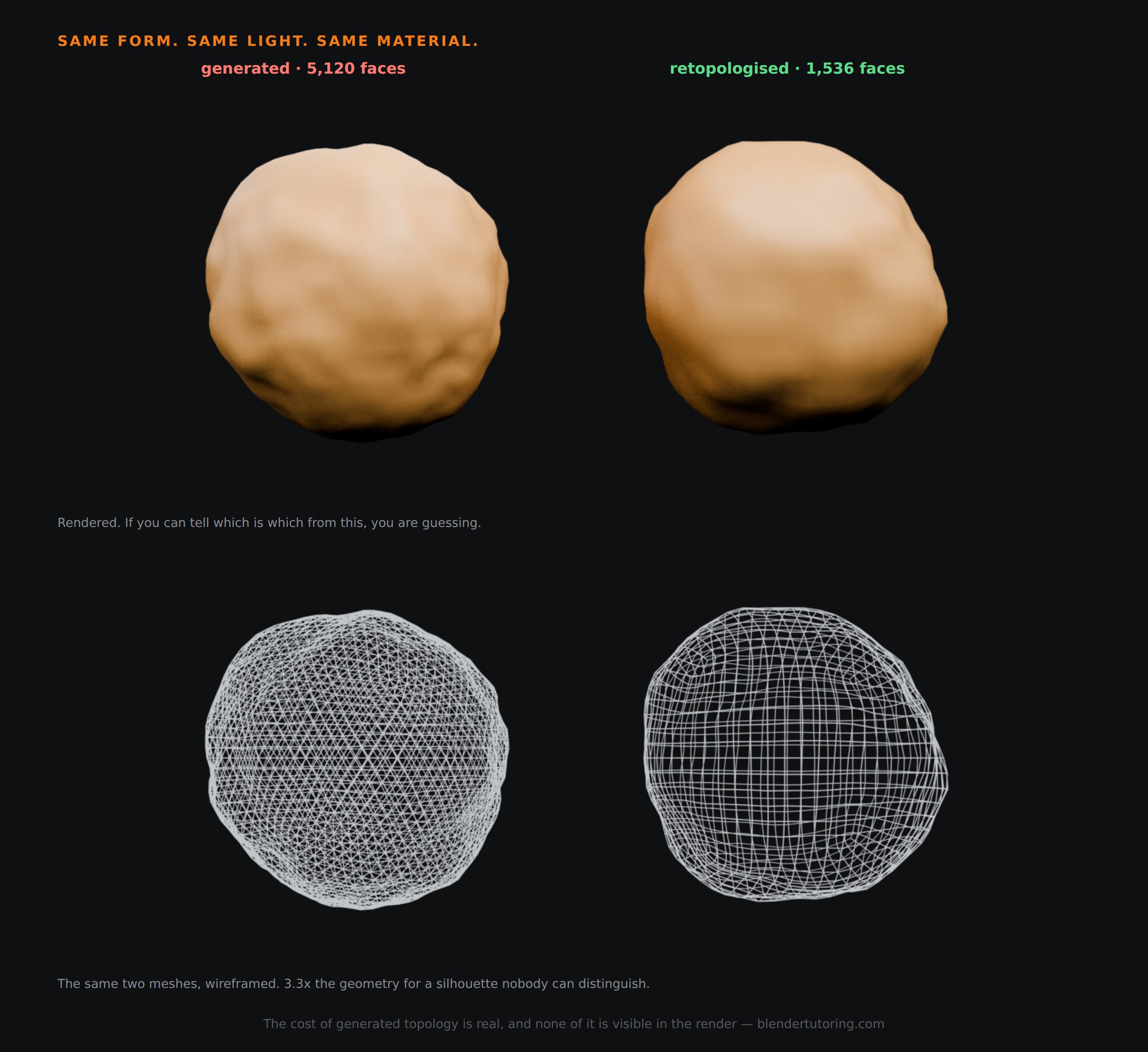
I also tried to make the difference show up. I subdivided both with Catmull-Clark and rendered again: still indistinguishable. I stretched both into a limb and bent them hard: still nothing you could point at in a still frame.
So let us be accurate about this. A generated mesh does not look wrong. It costs you, and every one of those costs is invisible in the render.
💸 Cost One: You Pay Three Times Over For The Same Silhouette
The numbers above are the whole argument. 5,120 faces against 1,536 — 3.3 times the geometry for an outline nobody can tell apart.
On one hero prop that is irrelevant. On a scene of forty of them, or a character you intend to subdivide, or anything bound for a real-time engine, it is the difference between a scene that runs and one that does not — and you will be diagnosing a slow viewport without ever suspecting the mesh that looked fine.
✂️ Cost Two: It Is Miserable To Edit
This is the one people feel first, and it never shows up in a comparison image.
On the quad mesh you can double-click an edge loop and have it select all the way round. You can loop cut. You can edge slide. Those tools exist because quad grids have direction — a loop has somewhere to go.
On the triangulated mesh none of that works. Loop select dies after a few edges. There is no loop to cut. Every change becomes manual vertex pushing, and a ten-second adjustment turns into ten minutes.
You do not notice this when you download the asset. You notice it the first time you need to change something.
🦴 Cost Three: It Deforms Without Edge Loops
My bend test did not produce a dramatic failure, and I am not going to pretend otherwise. On a smooth blob under a simple deform, both meshes behaved.
But that is not where deformation actually matters. It matters at an elbow, a knee, a shoulder — where you need two or three loops running around the joint for the surface to fold along. A triangle soup has no loops to place weights on, so there is nothing to distribute the rotation across, and weight painting it becomes guesswork.
The honest version of the rule: topology matters most where the surface moves, and barely at all where it does not. A generated rock is fine. A generated character is a problem you have deferred, not avoided.
🗺️ Cost Four: The UVs
Triangle soup unwraps badly. Seams have no natural edge to follow, islands come out fragmented, and texel density ends up uneven across the surface — so your texture resolution varies for reasons that have nothing to do with what matters in the shot.
If you have ever wondered why a downloaded asset textures strangely no matter what you do, this is usually where it started.
🤔 So When Does It Actually Matter?
Being proportionate, because "always retopologise" is bad advice too.
Leave it alone when: it is a static prop, it will never deform, you are not subdividing it, you will not need to edit it, and the poly count fits your budget. Background set dressing generated from a prompt is genuinely fine as it arrives. Spending an afternoon retopologising a rock nobody looks at is a worse mistake than the topology was.
Retopologise when: it will be rigged or deformed, it needs clean UVs for hand-painted texturing, you will be editing it repeatedly, or it is going into a real-time engine with a budget.
The decision is about the asset's future, not its appearance. Which is exactly why the render tells you nothing.
🧰 How To Check In Thirty Seconds
- Open the statistics overlay and look at the face count against what the object is worth in your scene.
- Alt-click an edge in Edit Mode. If the loop selection runs cleanly round the form, the topology has direction. If it stops dead, you have a soup.
- Look at the wireframe, not the render. It is the only view that tells the truth, which is the whole lesson here.
For what it is worth, the honest workflow for generated assets is usually: keep the form, rebuild the surface. The generated mesh becomes a sculpt to retopologise over rather than an asset to ship. That is still enormously faster than modelling the form from nothing, which is the actual win — just not the one the demos advertise.
🎯 The Underlying Idea
The reason this bites people is that every other modelling mistake announces itself. Bad normals go black. A missing seam stretches the texture. Shading artifacts smear across the surface. You can see all of them in the viewport, so you fix them.
Generated topology breaks that pattern. The render is the one place the problem does not appear, and the render is the thing everyone checks. So the asset passes inspection, goes into the scene, and the bill arrives weeks later — at the rig, at the UVs, at the frame rate, at the moment somebody asks for a small change.
Check the wireframe.
Read next: Quads vs Triangles in Blender: What Actually Matters — the general rule this is a specific case of, including where triangles are completely fine.
Working out whether an asset is worth rebuilding? Book a free intro call → and bring it. Deciding what to keep and what to redo is most of what the job actually is.
Newsletter
Get more tips like this
Short, practical Blender guides for beginners — straight to your inbox. No spam. Unsubscribe any time.