Blender 5 Features: What Actually Changed Across 5.0, 5.1 and 5.2
2026-10-25
Three releases in nine months, each with a changelog long enough to put you off reading it. Here is the whole Blender 5 line in one place, sorted by whether you will actually notice it.
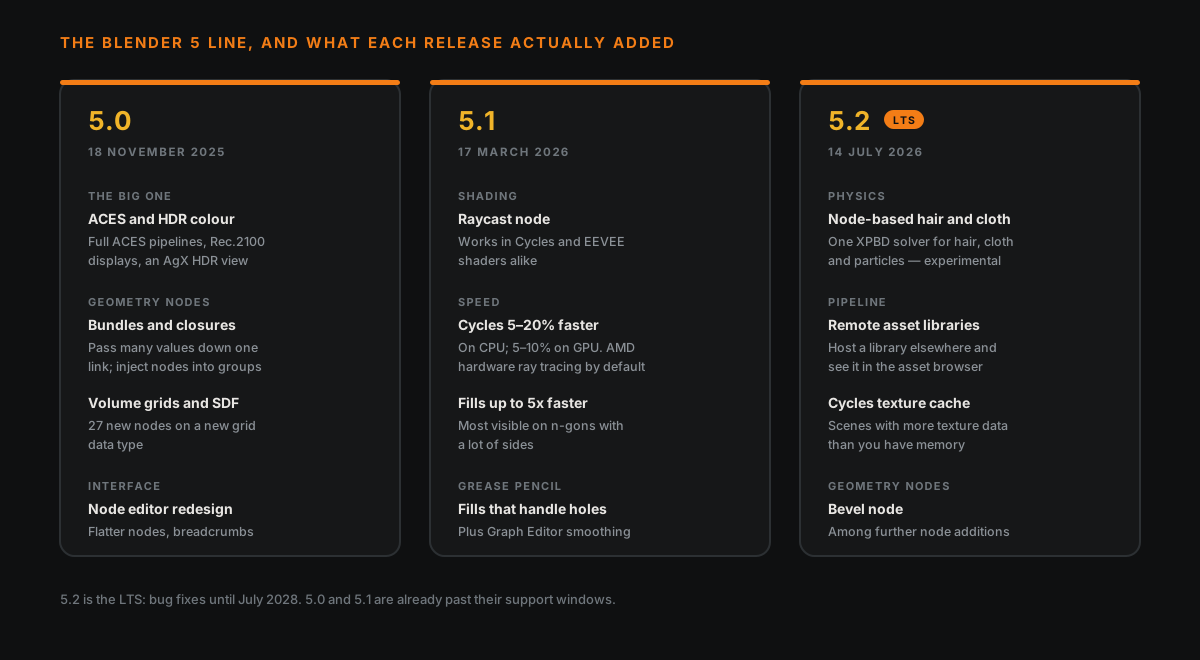
| Release | Date | Supported until |
|---|---|---|
| 5.0 | 18 November 2025 | Past its window |
| 5.1 | 17 March 2026 | Past its window |
| 5.2 LTS | 14 July 2026 | July 2028 |
If you are choosing one to install, install 5.2 LTS. Everything below is cumulative — 5.2 contains all of it.
🎨 Colour: The Change Most People Will Feel
Blender's own announcement called full ACES support and the HDR work the biggest change in 5.0 for most users, and that is a fair description.
ACES. ACES is the colour pipeline most film and games studios standardise on. Before 5.0, matching Blender's output to an ACES pipeline meant third-party configs and a certain amount of hoping. Now it ships. ACES 1.3 and 2.0 views sit alongside AgX and Filmic as view transforms.
HDR. 5.0 added HDR and wide-gamut output, plus Rec.2100-PQ and HLG displays for grading HDR video, and an AgX HDR view. On Linux this rides on Wayland and Vulkan; support varies by platform, so check your own before planning around it.
Does this matter to you? If you render for yourself, mostly no — AgX was already good and still is. If you hand work to anyone who says the word "pipeline", it matters a great deal, and it is the single strongest argument for being on 5.x at all.
🧩 Geometry Nodes: The Real Story Of This Release Line
Geometry Nodes got more attention across 5.x than anything else, and two of the additions change what is possible rather than making existing things faster.
Bundles. A bundle packs several values into one, so you pass them down a single link instead of dragging six noodles across the editor. Combine, Separate and Join Bundle nodes, plus a bundle socket type. If you have ever built a node tree that looked like spaghetti, this is the fix.
Closures. Closures let you inject nodes into a node group from outside it. Built with Closure Zones and run with an Evaluate Closure node. Practically: you write one generic setup and hand it the specific behaviour at the point of use, instead of making nine near-identical node groups. It is the biggest conceptual addition Geometry Nodes has had in years, and — fair warning — it is also the one that takes the most getting used to.
Volumes and SDFs. A new volume grid data type with a grid socket and 27 new nodes for working with volumes and signed distance fields. Procedural modelling that was awkward or impossible before is now routine.
Node-based modifiers. Six Geometry Nodes modifiers ship built in, including Array, Instance on Elements, Scatter on Surface, Randomize Transforms and Curve to Tube. You no longer build a scatter setup from scratch every time.
And in 5.2: a Bevel node, among further node additions.
New to any of this? The three ideas that make Geometry Nodes click is the place to start — the fundamentals have not changed, there is just more to build with.
🧪 Node-Based Hair And Cloth
The headline of 5.2, and the one to be careful about.
Hair and cloth simulation now exist inside Geometry Nodes, running on a new XPBD solver — one underlying multiphysics system covering hair, cloth and particles rather than three separate ones. Cloth can be added to any mesh through a node-based modifier, with controls for pinning, tearing, stretch and bendiness. Effectors like gravity and colliders are assigned per geometry, and you can build custom effectors with closures.
It is experimental. Blender's own notes say so, and several write-ups stress that it does not yet replace the existing simulation tools. Treat it as something to explore between projects, not something to put on a deadline. A couple of reviews describe it as a finished solver system; that overstates where it is.
🖼️ Rendering
Cycles
- Accurate subsurface scattering, thin-film iridescence for metals, and production-ready adaptive subdivision (5.0). The iridescence one is the fun addition — oil-slick and anodised-metal looks without faking them in the shader.
- Faster. 5.1 brought roughly 5–20% on CPU (reported on Windows) and 5–10% on GPU. AMD cards get hardware ray tracing through HIP RT by default.
- Texture cache (5.2), for scenes carrying more texture data than you have memory.
- A faster Voronoi texture, and Menu Switch support in shader nodes.
EEVEE
- Per-view-layer material overrides
- Faster light probe baking
- Better curve and hair rendering
- Faster shader compilation on NVIDIA GPUs
Both engines: the Raycast node (5.1) works in Cycles and EEVEE shaders, which is unusual — most shading additions land in one and arrive in the other later, if ever.
Still deciding between the two engines? The differences that actually affect the choice have not moved in 5.x. And if your renders are coming out grainy, that is a sampling problem, not a version problem.
🧱 Modelling, Sculpting And Animation
The quieter improvements, which is not the same as unimportant.
| Area | What changed | Release |
|---|---|---|
| Modelling | Fills up to 5x faster, most visible on n-gons with many sides | 5.1 |
| Modelling | Snapping to face centres | 5.1 |
| Sculpting | Tablet pressure curves for brush size, strength and jitter | 5.0 |
| Sculpting | Sculpt undo uses roughly 10% less memory | 5.0 |
| Animation | Shape key evaluation notably faster on high-poly meshes | 5.1 |
| Animation | Gaussian smoothing modifier in the Graph Editor | 5.1 |
| Rigging | New Geometry Attribute constraint | 5.0 |
| Grease Pencil | Motion blur, sharp and flat stroke corners | 5.0 |
| Grease Pencil | Fill workflow that handles holes | 5.1 |
The shape key one is worth pulling out if you animate faces: it was a known bottleneck and it is now meaningfully quicker on dense meshes.
🖥️ The Interface Changed More Than You Expect
The node editor was redesigned. Nodes are flatter with lighter shadows and crisper outlines. Group nodes are drawn as a stack and lost their icon; you enter them with a double-click and leave via breadcrumbs or by double-clicking empty space. Node tooltips now show the Python ID, which is a small mercy if you write addons.
The theme system was consolidated — over 300 settings unified or removed. Custom themes built for 4.5 may not survive the move. Worth knowing before you wonder where your theme went.
The compositor also gained an asset shelf.
🔌 Pipeline Plumbing
Invisible until the day it saves you:
- Remote asset libraries — host a library elsewhere and have it appear in the asset browser. A studio feature on paper, genuinely useful if you work across two machines.
- Hydra 2.0 for USD, and glTF import/export of point clouds.
- Python 3.13 and the rest of VFX Platform 2026 alignment (5.1).
That Python jump is also the thing most likely to have broken an addon you rely on, which is a whole separate question — does your setup still work on Monday covers the compatibility side properly, including a ten-minute check to run before you move a project across.
🎮 If You Make Game Assets
Most "what's new" coverage is written for generalists. Narrowing it to this site's corner:
Worth your attention: the Geometry Nodes additions, every one of them. Scatter on Surface and Instance on Elements as built-in modifiers remove a chunk of repeated setup from environment work. Closures are how you stop rebuilding the same node group with tiny variations.
Worth knowing about: ACES, the moment you work with anyone else. Colour mismatches between Blender and an engine are miserable to debug and this is the layer they live in.
Safe to ignore for now: node-based cloth and hair. It is experimental, and game hair is usually cards and a texture rather than simulation anyway.
Changes nothing: your export workflow. FBX and glTF behave as they did, which means scale and rotation still arrive wrong in the same old way if you do not apply transforms, and the Blender-to-Unreal handoff is the same handoff.
🎯 What To Actually Do
Install 5.2 LTS. It holds everything in this article and gets fixes until July 2028, so you can stop thinking about versions for two years.
Install it alongside your current version, not over it. Blender runs several versions side by side quite happily, and there is no reason to delete the one that works until you have opened your heaviest file in the new one and rendered a frame.
If you are learning rather than producing, none of this should change what you do next. Every one of these features sits above the fundamentals, and the fundamentals have not moved since 4.x — which is also why tutorials recorded two years ago still teach you correctly. The order to learn it in is unchanged.
A note on sources: this is assembled from Blender's release notes and announcements plus third-party coverage of each release. Where numbers are quoted — the Cycles speedups, the 5x fills, the 10% undo memory — they are the figures reported at release, measured on somebody else's hardware. Treat them as the shape of the improvement rather than a promise about your machine.
Read next: Should You Upgrade to Blender 5.2 LTS? — the other half of this question. Your files are fine; your addons are the risk.
Want a hand getting a 5.x feature into your actual workflow rather than reading about it? Book a free intro call →. Geometry Nodes closures in particular are much faster to learn with someone walking you through a real setup.
Newsletter
Get more tips like this
Short, practical Blender guides for beginners — straight to your inbox. No spam. Unsubscribe any time.